
Mixtube Lite- Healing Melody
Next G SolutionMusic & Audio
4.219.00 Reviews
- Version
- 1.2.0
- Installs
- 500.00K
- Age Rating
- Everyone
Screenshots

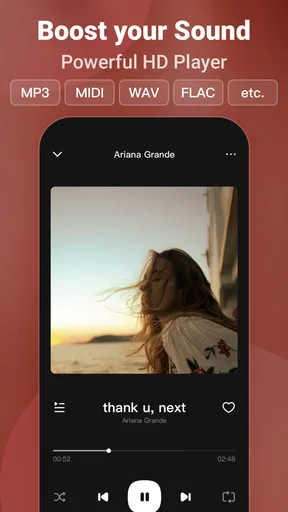
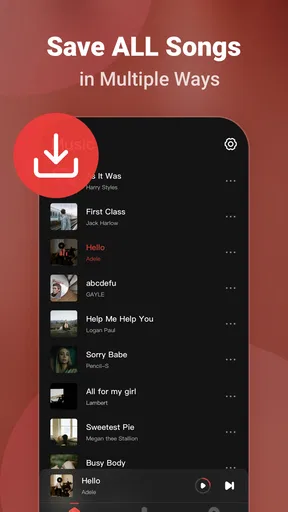
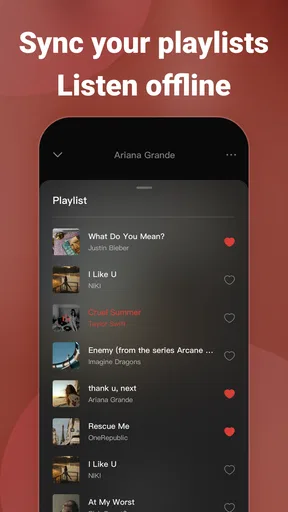

Our Review of Mixtube Lite- Healing Melody
 Analysis by Appyee
I approached Mixtube Lite- Healing Melody as a practical music and audio app rather than expecting it to replace every service on my phone. Its appeal is easy to understand: it is free, aimed at discovering less mainstream music, and built around the simple pleasure of gathering songs into personal playlists. After spending time with it, I found the experience most rewarding when I treated it as a focused listening space instead of an all-purpose music command center.
The app comes from Next G Solution and carries a 4.2 average from around 989 ratings, with more than 500 thousand installs. Those figures suggest that it has found a genuine audience, but they do not tell the whole story. What matters in daily use is whether its lightweight approach fits the way you search, save, and revisit music. For me, the answer was yes when I wanted a calmer discovery routine, although there are clear situations where a larger, more established music platform remains the better choice.
How I built a dependable listening routine
My basic workflow was deliberately simple. I opened the app when I wanted to look beyond the most obvious songs, explored a track that caught my attention, and then decided whether it deserved a place in a playlist. That last step is important. Instead of saving everything immediately, I used separate playlists for moods or situations, such as quiet background listening, evening walks, and songs I wanted to investigate later.
This approach made the app feel more useful over time. A single discovery session can easily become messy if every interesting tune goes into one large collection. I found that keeping a temporary playlist for untested discoveries worked better. After listening again, I moved only the tracks that still suited me into a more permanent playlist. It is a small habit, but it prevents the familiar problem of building a huge list that I rarely want to play from beginning to end.
The store summary presents the service as a place to discover niche music, create custom playlists, and collect appealing songs. In practice, I would describe the strongest part as the connection between those activities. Discovery is not isolated from organization: when I found something worthwhile, I could immediately give it a place in my own listening system. That makes the app more satisfying for people who enjoy curating rather than simply pressing play on an automatically generated mix.
A realistic everyday example is a weekday commute. I might spend a few minutes looking for unfamiliar music before leaving home, place promising tracks in a “commute tests” playlist, and listen through that list later without interrupting the journey to search again. At the end of the week, I can keep the songs that worked and remove the ones that did not. This turns casual browsing into a repeatable habit instead of a series of disconnected searches.
I also liked using playlists as a form of memory. When a track had the right atmosphere but I was not ready to decide whether it belonged among my favorites, I could keep it in a themed collection. That avoided forcing an immediate judgment. For niche music especially, a song may need the right setting before it makes sense, so separating “interesting” from “trusted favorite” gave my library a more useful shape.
What to check before settling into the app
Because Mixtube Lite is free and has an Everyone content rating, it is approachable for a broad audience. I would still begin with a short setup session rather than assuming the default arrangement will match my habits. I checked how easily I could move between discovery and saved playlists, whether the controls felt comfortable with one hand, and how much effort it took to return to a song I had already noticed.
Those checks matter more than they sound. A music app can have a pleasant catalog and still become frustrating if returning to a half-finished discovery session is awkward. I recommend creating one small test playlist first. Add a handful of tracks, leave the app, come back later, and see whether the collection remains easy to find and use. This gives a better impression of the app than simply browsing for a few minutes.
The current version is 1.2.0, and the minimum requirement is Android 8.0. That makes it suitable for many older Android devices, which fits the “Lite” identity nicely. On a phone that is not designed for demanding modern applications, a focused music tool can be more comfortable than a feature-heavy alternative. I would not choose an app based on version number alone, but compatibility is a practical advantage for anyone keeping an older handset in service.
I paid attention to the difference between a playlist that reflects a mood and one that is merely a storage box. My most useful collections had a clear purpose and a manageable size. For example, a playlist for reading worked better when it stayed consistent, while a broader “discoveries” list could remain more experimental. This distinction helped me understand what the app was doing well: it gave me room to shape the listening experience myself.
Another useful check is to decide how much manual involvement I actually want. This is not the app I would pick if my main goal were to surrender all decisions to a highly personalized automatic service. Its value increases when I enjoy choosing tracks, naming collections, and refining them gradually. If I want music to appear with almost no input from me, a conventional streaming platform with mature recommendation systems may feel more effortless.
Small habits that made discovery faster
Experienced use is less about searching endlessly and more about creating a rhythm. I found it faster to work in short sessions with a clear purpose. One session was for finding new material, another for cleaning playlists, and another for relaxed listening. Mixing all three activities together made me spend more time deciding what to do next.
My favorite pattern was the two-stage playlist method. First, I created a temporary collection for songs that seemed promising. Then, after listening in a different context, I moved the strongest tracks into a permanent playlist. This is especially helpful when exploring unfamiliar styles because the first impression is not always reliable. A song that feels unusual during active browsing may become a favorite when played during a walk or while doing routine work.
I also used descriptive playlist names instead of vague labels. A name such as “soft background” tells me how to use the collection, while a name such as “good songs” tells me almost nothing. This is not a special feature; it is a practical way to get more value from custom organization. The app rewards that kind of personal structure because its usefulness grows with the quality of the collections I build.
When I found several related tracks, I resisted the temptation to save every one of them at once. I chose a few representatives, listened again, and only then expanded the playlist. This kept discovery from turning into clutter. It also made the next listening session more informative because each track had earned its place instead of arriving as part of an oversized batch.
For quick access, I kept my most frequently used playlist near the top of my own routine rather than repeatedly searching for it. The exact convenience depends on how the app presents its navigation on a particular device, so I would not promise the same shortcut to everyone. The general lesson is still useful: once a playlist becomes part of daily life, organize your opening steps around it instead of treating every session like a first visit.
Another efficient pattern was to use a playlist as a decision queue. I added tracks that required a proper listen, played them when I had time, and removed anything that did not hold up. This turned the app into a manageable music inbox. It is a better fit for people who like exploring but dislike losing promising discoveries in an unstructured history.
Where the lightweight approach reaches its limits
The same simplicity that makes Mixtube Lite approachable also defines its boundaries. I would not recommend it as the only music app for someone who expects a complete replacement for a major streaming service. Users who depend on a highly developed recommendation engine, extensive account ecosystems, sophisticated social sharing, or a very deep set of playback controls may prefer a larger alternative.
There is also a trade-off between control and convenience. Custom playlists give me a stronger sense of ownership over the listening flow, but they require attention. I need to decide what belongs in each collection and occasionally tidy things up. Someone who wants an endless, automatically refreshed stream may see that responsibility as work rather than enjoyment.
My advice is to judge the app by the type of listening problem you want to solve. If the problem is “I keep hearing the same popular material and want to explore something different,” this app has a clear purpose. If the problem is “I need every artist, album, device feature, and recommendation tool in one place,” the usual full-scale music services are likely to be more complete.
I would also avoid building an important listening routine around assumptions about features that are not central to the app’s identity. The safest way to use it is to focus on what it clearly does: discover music, arrange personal playlists, and return to songs that caught your attention. That mindset prevents disappointment and makes the experience feel more coherent.
For families or casual listeners, the Everyone rating is reassuring from an accessibility standpoint, but it should not be confused with a guarantee that every song will suit every personal taste. Music discovery is subjective. I still recommend checking new material before placing it into a shared playlist or handing the phone to a younger listener, particularly when the collection is intended for a specific household atmosphere.
The app is also less compelling for people who rarely revisit music. If I only want to sample one track and move on, the playlist-building side has less value. Its real strength appears after several sessions, when saved songs begin to form useful groups. In other words, the more I cared about building a personal listening library, the more worthwhile the app became.
Who should use it, and who should look elsewhere
I would recommend Mixtube Lite to listeners who like discovering overlooked music and shaping their own listening environment. It suits someone who enjoys making a playlist for a particular mood, activity, or time of day, then improving that collection gradually. It is also a sensible option for an older Android phone because the minimum operating-system requirement reaches back to Android 8.0.
It is a particularly good fit for a curious listener who feels overwhelmed by large music services. A smaller, more focused experience can make exploration feel intentional. Instead of being surrounded by countless categories and recommendations, I could concentrate on finding a few songs that genuinely fit my taste and then organize them in a way that made sense to me.
I would look elsewhere if advanced playback tools, broad platform integration, or deeply automated recommendations are essential. A full-featured competitor will usually be better for someone who wants a polished ecosystem built around albums, artists, synchronized libraries, and hands-off discovery. Mixtube Lite is not weakened by failing to be that product; it simply serves a different purpose.
The free price makes trying it low-risk, and the audience size shows that it is not an obscure experiment with no user base. Still, I would install it because its workflow sounds useful, not because the rating alone settles the decision. A 4.2 average from around 989 ratings is encouraging, but my own experience suggests that personal expectations matter more than the number.
My verdict after making it part of a routine
Mixtube Lite works best when I use it as a deliberate discovery and playlist-curation tool. Its strongest idea is not simply finding another song; it is helping me turn that discovery into a personal collection I can actually use. The two-stage playlist habit, clear naming, and regular cleanup made a noticeable difference to my experience without requiring complicated procedures.
I appreciate that the app leaves room for personal taste. It does not ask me to accept a fixed listening identity, and it feels natural to build collections around real situations rather than abstract genres. That makes it a pleasant companion for commutes, quiet evenings, study sessions, or any routine where I want music chosen with a little more care.
My final recommendation is therefore specific: try it if you want a free music and audio app focused on niche discovery and custom playlists, especially on an Android device running a compatible version. Give it a fair test by creating a temporary discovery list, revisiting those tracks later, and organizing the keepers into purposeful collections. The key is to use its manual control as an advantage, not expect it to behave like an all-in-one streaming giant.
For me, that balance makes Mixtube Lite- Healing Melody worth keeping around. It is not the universal answer for every listener, and experienced users will notice the limits of a lightweight approach. But when I want to escape familiar recommendations, collect promising songs, and build playlists that reflect how I actually spend my day, it offers a clear and enjoyable path.
Verdict
Strengths of Mixtube Lite- Healing Melody
- Simple interface makes the app easy to navigate.
- Relaxing melodies can help create a calmer bedtime routine.
- Lite design should work well on older or budget devices.
- Useful for background listening while studying or meditating.
- Quick access to soothing audio without complicated setup.
Limitations of Mixtube Lite- Healing Melody
- The music selection may feel limited for frequent listeners.
- Some features may require an internet connection.
- Audio customization options appear fairly basic.
- Background playback may vary by device or system settings.
- The app may include ads that interrupt the listening experience.
Similar Picks in This Category
View All
YouTube Music
Google LLC4.4

Samsung Music
Samsung Electronics Co., Ltd.3.8

Spotify: Music and Podcasts
Spotify AB4.3

JioSaavn - Music & Podcasts
Saavn Media Limited4.3

Lark Player:Music Player & MP3
Lark Player Studio - Music, MP3 & Video Player4.6

StarMaker: Sing Karaoke Songs
SKYWORK AI PTE. LTD.4.3
Frequently Asked Questions
What is Mixtube Lite- Healing Melody used for?
Mixtube Lite- Healing Melody is designed for users who want calming audio and relaxing background music during quiet moments. It may be useful for meditation, reading, studying, resting, yoga, or preparing for sleep. The app focuses on soothing melodies and an uncomplicated listening experience rather than demanding interaction, making it suitable for short relaxation sessions or longer periods of peaceful background sound.
Does Mixtube Lite- Healing Melody work offline?
Offline availability can depend on the specific version of the app and how its audio content is delivered. Before relying on it during travel, meditation, or in an area without internet access, check whether tracks can be downloaded or played without a connection. If offline playback is not supported, the application may require mobile data or Wi-Fi, and streaming could increase battery and data usage.
Is Mixtube Lite- Healing Melody free to download and use?
Mixtube Lite- Healing Melody may be available as a free download, but users should review the store listing carefully for advertising, optional purchases, subscriptions, or limitations on particular sounds and features. Pricing and availability can change between Android and iOS versions. Checking the permissions, billing information, and subscription terms before confirming a purchase is recommended.
Can Mixtube Lite- Healing Melody be used for sleep or meditation?
The app can be suitable for sleep preparation, meditation, breathing exercises, and other relaxing routines because its purpose is centered on gentle, healing-style melodies. However, the ideal sound and volume level will differ from person to person. It should be treated as a relaxation aid, not a medical treatment, and users should avoid listening at high volume or while performing activities that require full attention.
What permissions and privacy considerations should users check?
Before installing Mixtube Lite- Healing Melody, review the permissions requested by the Android or iOS version. A music and relaxation app may need access related to audio playback, notifications, or internet connectivity, but unnecessary permissions deserve closer attention. Also read the developer’s privacy policy to understand whether usage data, device information, or advertising identifiers are collected and shared.
